For CA & accounting firms in India
Stop chasing clients for documents.
One link with your price list and a checklist of exactly what you need. Clients upload from their phone, you see what's missing, and they pay your fee by UPI.
No credit card · Clients don't need an account · Code DOCS20 = 20% off
How it works
From "sir, which documents?" to filed — in three steps
Share your client page
Set your services and prices once. Share one link on WhatsApp or your website.
Clients upload & pay
They pick a service, upload documents from their phone and pay your fee by UPI.
You review & file
Approve, ask for re-uploads, send reminders and download everything as one ZIP.
Features
Everything you need to collect documents
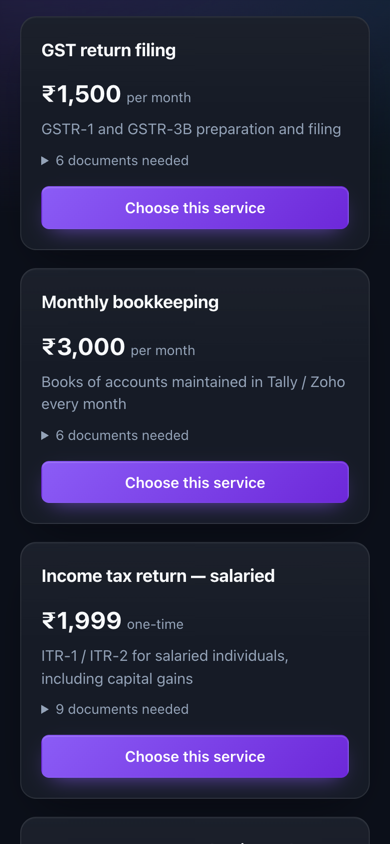
Your price list online
Show your services and fees on your own client page. Clients choose what they need.
Ready-made checklists
GST, ITR, TDS, audit and bookkeeping lists. Edit them or create your own.
Upload from the phone
One link, no app. Clients upload PDFs, Excel files or photos.
One-click reminders
WhatsApp or email reminders that list only what’s still missing.
Review and approve
Approve each document or send it back with a note the client can see.
Keep files organised
Move misfiled documents, rename, reorder. Download everything as one ZIP.
Get paid by UPI
Clients pay with GPay, PhonePe or Paytm straight to your bank. No fees.
Always know where you stand
New requests, overdue work, documents to review and unpaid fees at a glance.
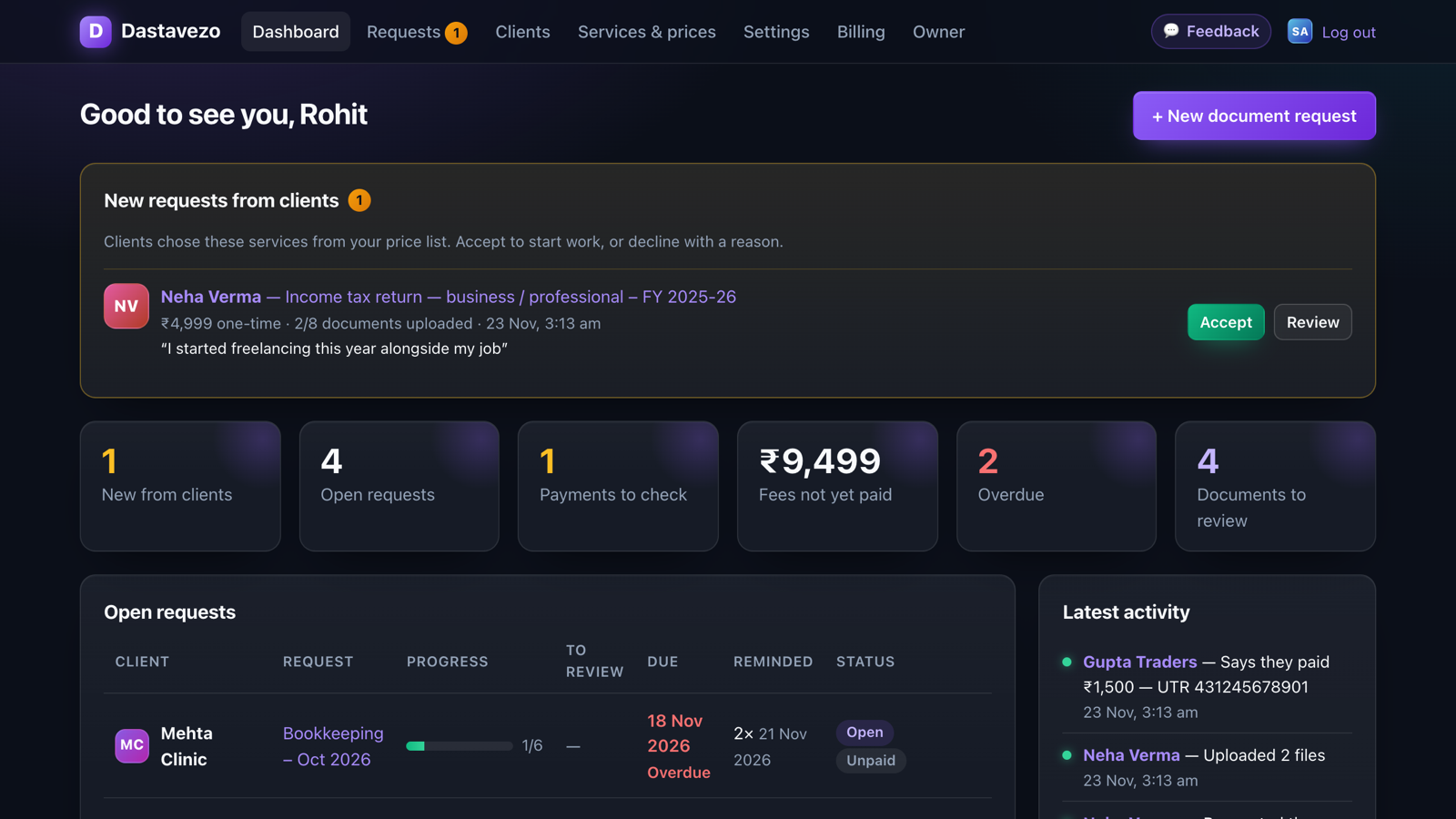
Your dashboard
See every client, every document, every rupee
- New requests from your client page, ready to accept
- Overdue work and documents waiting for review
- Payments to confirm and fees not yet paid
- Everything a client did, in one activity feed
For your clients
Your clients will thank you
- They see exactly which documents you need — no guessing
- They upload from their phone in a minute, even a photo
- They see what's received, approved, or needs another try
- They pay your fee by UPI in one tap
- They track every request in one place
Early access
Be one of our first CA firms
We're onboarding our first firms now. Try Dastavezo free, tell us what would make it perfect for your practice, and help shape what we build next.
Security
Safe for your clients' documents
Private by default
Every client link is secret and unique. Documents download only for your logged-in firm.
Secure connection
Everything is sent over HTTPS. Logins are protected against password guessing.
Your money stays yours
Client payments go straight to your UPI ID. Dastavezo never holds your money.
Pricing
Simple pricing. Start free.
Pay monthly, or yearly and save 20%. Code DOCS20 takes another 20% off.
Starter
For solo CAs getting started
₹999/month
Billed monthly
With DOCS20: ₹799/month
Choose Starter- Up to 50 clients
- 1 login
- Client page with your price list
- Ready-made GST, ITR, TDS & audit checklists
- WhatsApp & email reminders
- UPI payments from clients
Practice
For growing firms
₹2,499/month
Billed monthly
With DOCS20: ₹1,999/month
Choose Practice- Up to 300 clients
- 5 team logins (coming soon)
- Everything in Starter
- Unlimited document requests
- Download all documents as one ZIP
- Priority WhatsApp support
Firm
For established firms
₹5,999/month
Billed monthly
With DOCS20: ₹4,799/month
Choose Firm- Unlimited clients
- 15 team logins (coming soon)
- Everything in Practice
- Help moving your existing clients in
- Custom checklists set up for you
- Dedicated onboarding call
Every plan starts with a 14-day free trial. Prices in Indian rupees. Pay by UPI.
FAQ
Questions
Do my clients need to install an app?
No. Clients open a link in their phone browser. They can upload PDFs, Excel files or just take a photo.
How do my clients pay my fees?
Add your UPI ID in Settings. Clients see a "Pay with UPI" button and a QR code, and the money goes straight to your bank account. Dastavezo never touches it and charges no fee on it.
How do I pay for Dastavezo?
Choose a plan on the pricing page and pay by UPI from any app. Enter the transaction number (UTR) and your plan is switched on as soon as the payment is confirmed.
What happens after the free trial?
You get 14 days free with every feature. After that, choose a monthly or yearly plan to keep going. Your data stays where it is.
How does the DOCS20 code work?
Enter DOCS20 at checkout to get 20% off. It works on monthly and yearly plans, and on yearly plans it comes on top of the yearly saving.
Can I change or cancel my plan?
Yes. Plans are paid in advance for a month or a year and don’t renew by themselves, so you simply don’t pay again if you want to stop.
Who can see the documents?
Only your firm. Each client gets a secret link, files are only downloadable after you log in, and other firms can never see your clients.
Spend your time on filing, not follow-ups.
Start your free 14-day trial today. Use code DOCS20 for 20% off when you choose a plan.